Voice GPS Navigation Direction
- 4.0
- Rating
- 100.00K
- Installs
- Free
- Price
 Analysis by App-foxy
Voice GPS Navigation Direction is the kind of Android navigation app I would try when I want a straightforward route planner without paying at the starting line. Developed by Appsiun Technology, it sits in the maps and navigation category and focuses on spoken guidance, driving directions, and turn-by-turn route planning. In everyday use, that combination sounds simple, but the quality of the experience depends heavily on how carefully the route is prepared and whether the phone is ready to provide location and audio information.
I approached it less like a novelty and more like a tool I might use before driving across an unfamiliar part of town. The app is free to install, carries an Everyone age rating, and has reached over one hundred thousand installs. Its current version is 1.6.2, so it is clearly an active product rather than an abandoned experiment. My overall impression is positive for short, ordinary journeys, although I would not treat it as the only navigation option for a complicated trip where dependable live information is essential.
Where the experience can become confusing
The first point where I would expect users to hesitate is before the car even moves: entering a destination and deciding whether the displayed route is actually the one they want. A route planner can appear ready while the starting location is still settling, the destination has been interpreted too broadly, or the map is showing a route that is technically valid but inconvenient. I recommend pausing for a few seconds after opening the app and checking the start and end points visually instead of immediately following the first instruction.
You May Also Like

 Blood Strike: 2.5 Anniversary
Blood Strike’s Loadouts Turn Every Drop Into a Tactical Gamble
A close look at Blood Strike’s custom loadouts: how fast access to signature weapons reshapes its battle royale rhythm, rewards preparation, and narrows the gap between fights.

 Pandora - Music & Podcasts
Pandora’s Music Is Easy to Start, but Harder to Recover
Pandora’s strength is its low-effort path from a seed to a station. Its weak spot is how much confidence it asks you to place in connection, setup, and quiet recovery.

 8 Ball Pool
 Is Built on Rivalries, Rematches, and Routine
A close look at the rivalries, rematches, shared routines, and unanswered safety questions that turn a quick pool match into a persistent mobile community.

 Samsung Music
’s Quiet Strength Is Playing What You Already Own
Its reach comes less from spectacle than from dependable access to a personal library. That simplicity is both the app’s strongest retention engine and its ceiling.

 AccuWeather: Weather Radar
AccuWeather Review: A Quick, Clear Forecast for Everyday Decisions
For everyday plans, the best forecast is the one you can understand quickly. AccuWeather makes rain timing, radar, and local conditions easy to act on, with a few trade-offs.

 Hill Climb Racing
Why Hill Climb Racing Still Turns Crashes Into One More Run
A tiny car, a bumpy hill and one more upgrade: Hill Climb Racing keeps resurfacing because its simple chaos makes every near-miss feel personal.
More From Our News Desk



That small habit matters particularly when a destination has several entrances. A shopping center, hospital, campus, or large office complex may have one address but multiple practical arrival points. If I were meeting someone at a side entrance, I would search for the most precise destination available rather than assuming the main address will place me exactly where I need to be. The app can plan the drive, but I still need to supply a useful target.
Voice guidance is helpful because it lets me keep my eyes on the road, yet spoken instructions are not a substitute for checking the route before departure. I like to review the general direction first: whether the route sends me through a busy central area, uses a motorway, or takes a longer-looking road that may be easier to follow. This is one of the practical differences between using a dedicated navigation app and simply searching for an address. The map should support a decision, not make the decision invisible.
Another common stumbling block is assuming that a route planner knows the reason for a journey. It knows where I want to go, not whether I prefer fewer turns, a familiar road, a scenic route, or a particular type of road. If the suggested path does not match my priorities, I would rather adjust the destination or reconsider the route before driving than keep following instructions and hope the result improves.
The most useful preparation is a thirty-second route check before pulling away. I look at the destination label, the broad path, and the first few turns. That quick check reduces the chance of discovering an avoidable mistake while already in traffic.
What I check before relying on spoken directions
I begin with the phone itself. Location must be available, and the device needs a clear enough view of the sky or surrounding environment to establish a position. In a garage, between tall buildings, or inside a dense urban area, the initial location may take longer to become precise. If the marker is still moving or sitting on the wrong street, I do not start driving yet. Waiting at a safe stopping point is much easier than correcting a route while moving.
Next, I check the volume using the controls I normally use for media or navigation audio. A route can be active while the spoken instructions remain too quiet to hear. I also make sure the phone is not connected to an unexpected audio device. In a car, sound may be directed through the vehicle rather than the handset, and that can make the app appear silent even though it is producing instructions.
I also check whether the destination was entered in the right place. Similar street names, nearby towns, and abbreviated addresses are easy to confuse. This is especially important when traveling outside my usual area. I prefer to include enough address detail to distinguish one location from another, then confirm the map pin before beginning the journey.
Because the app is free but offers in-app purchases ranging from about nine dollars to nearly thirty-nine dollars per item, I would pay attention to any purchase screen and read what it offers before confirming anything. I would not assume that every useful navigation action requires payment, nor would I tap through a purchase simply to dismiss a prompt. The sensible approach is to use the free experience first and decide later whether an optional item is genuinely useful for my needs.
That is also why I would install and test it at home, not for the first time while rushing to an appointment. A short local drive gives me a chance to learn how the route screen presents turns, how voice output behaves on my phone, and how quickly I can recognize a rerouted instruction. The test does not need to be elaborate; the point is to remove uncertainty before a high-pressure trip.
A setup routine that prevents most avoidable problems
Open the app while stationary and allow the current position to settle before choosing a route.
Enter the destination carefully, then compare the written result with the visible map location.
Review the first part of the route and look for an obviously unsuitable starting direction.
Raise the relevant audio volume and confirm where the phone is sending sound.
Start the drive only after the route and voice instructions are understandable.
I find this routine more valuable than repeatedly reinstalling an app whenever navigation feels wrong. Many apparent app failures are actually destination-entry mistakes, a quiet audio channel, or a location signal that has not settled. The routine also makes it easier to identify a genuine problem because the basic conditions have already been checked.
Recovering when the route stops making sense
Every navigation tool needs a recovery plan. If I miss a turn, I do not try to force the original instruction. I continue safely, let the route update if it does so, and wait for the next clear direction. Making an abrupt maneuver to obey an old instruction is never worth it. A missed turn is a minor inconvenience; an unsafe correction is a serious one.
If the map appears frozen, I first ask whether I am in a place where the phone can determine its position reliably. Tunnels, underground parking, narrow streets surrounded by tall buildings, and areas with obstructed signals can all make the position seem delayed. I would wait until reaching a more open and safe location, then check whether the marker begins moving again. Restarting immediately may not solve an environmental positioning problem.
When the app seems to have lost the route, I would stop somewhere legal and safe before interacting with the screen. I would then confirm that the destination is still correct and that the phone has not switched to another screen or audio output. If necessary, I would begin the route again rather than trying to interpret a partially updated instruction. Re-entering a destination may feel repetitive, but it gives me a clean starting point.
A useful recovery habit is to remember the last confirmed road rather than the last spoken sentence. Voice instructions can be easy to mishear in heavy traffic. The map gives a second reference, and a quick glance while safely stopped can clarify whether I am still on the planned road or have already moved onto an alternative. I never recommend staring at the screen while driving; the app should reduce distraction, not create it.
For a longer trip, I would prepare a backup in advance. That does not mean keeping multiple navigation screens active at once. I might write down the destination, know the general direction, or have another familiar map option available if the phone loses signal or the app becomes unresponsive. Voice GPS Navigation Direction is useful as a primary guide for ordinary drives, but a backup is sensible whenever arriving on time matters.
Small workflow choices that improve the result
One non-obvious advantage of a voice-led route is that I can use the map as a confirmation tool instead of constantly watching it. I listen for the next instruction, glance only when stopped or when traffic conditions allow, and keep my attention on the road. This is more comfortable than treating the map as a moving video that must be monitored every second.
I also prefer to set the route before connecting the phone to the car. If I connect first, the vehicle may take over audio in a way I did not expect, or another application may become the active audio source. Preparing the route beforehand separates two possible problems: route planning and sound delivery. If both are changed at the same time, it becomes harder to know what went wrong.
Another practical trade-off is destination precision versus speed. Typing a complete address takes longer than choosing the first suggestion, but it can prevent a much longer detour. I especially use the more careful approach for airports, medical buildings, event venues, and large residential developments. A navigation app can only be as precise as the location I select.
I would also avoid changing the destination repeatedly while moving. If plans change, I stop first, update the route, and then check the new first instruction. This workflow keeps the app useful without turning it into a source of distraction. It is a simple distinction, but it is one of the clearest ways to get value from voice navigation safely.
When the app is not the cause
It is tempting to blame the navigation app whenever the route feels inaccurate, but the surrounding conditions often explain the problem. A phone with weak positioning, a muted audio channel, an incorrect clock, or an unstable connection can create symptoms that look like a software failure. I would check these basics before deciding that the app itself is unreliable.
Location accuracy can be affected by the environment. If the position jumps between nearby roads, I would not trust a turn instruction until the marker stabilizes. I would also avoid beginning a route from an underground space if I can move to an open area first. This is not a special weakness of this particular app; it is a general limitation of phone-based positioning that becomes obvious when the surroundings are difficult.
Traffic conditions are another important distinction. A route may be perfectly valid while the journey still takes longer because roads are busy, construction changes access, or a temporary closure has appeared. I would treat the suggested path as guidance rather than a guarantee of arrival time. For a routine trip, that is acceptable. For a time-critical journey, I would leave extra time and verify the larger travel plan through another trusted source.
There is also a difference between navigation and local knowledge. The app can guide me toward a destination, but it does not replace signs, road markings, temporary police directions, or instructions from staff at a venue. If a sign contradicts an old voice instruction, I follow the sign and reassess once safely stopped. Real roads change faster than any route display can reflect.
This is where I would choose a more established alternative instead. If I need extensive live traffic context, detailed transit planning, frequent offline use, or highly specialized road information, a larger mapping platform may suit me better. Voice GPS Navigation Direction makes more sense when I want a focused driving guide and am comfortable checking the route myself rather than expecting a complete travel information system.
Who will appreciate it most
I think the app is a good match for drivers who want spoken directions for familiar types of trips but do not need a complicated planning suite. Someone visiting a nearby town, driving to a new restaurant, or making several ordinary stops can benefit from having a route prepared without paying an upfront price. The Everyone rating also makes it suitable for a broad audience, although safe adult supervision and sensible driving habits still matter whenever a phone is involved.
It may also suit people who find constant map watching tiring. Once the destination is confirmed and the audio is working, the spoken prompts can keep the screen in a supporting role. That is particularly useful for a driver who wants occasional visual confirmation rather than a dashboard filled with information.
I would be more cautious about recommending it as the sole tool for international travel, remote roads, complex multi-stop planning, or journeys where live changes are central to the decision. Those situations reward deeper map coverage and more specialized features. The app is not a poor choice in those cases simply because it is free; it is a question of matching the tool to the level of information required.
The rating gives a useful indication that the app has found an audience, with a four-point average from around one thousand four hundred ratings. I would read that as encouraging but not decisive. A rating cannot tell me whether the reviewers used the app for the same kind of driving I do, so I place more weight on the setup experience and on whether its basic voice guidance behaves consistently on my phone.
My practical verdict
After looking at the complete workflow, I see Voice GPS Navigation Direction as a sensible free starting point for straightforward driving directions. Appsiun Technology has kept the central idea easy to understand: choose a destination, follow the planned route, and use voice guidance to reduce the need to watch the display. The app’s value comes from that focused purpose rather than from trying to replace every map and travel service.
My recommendation is to test it on a short drive before trusting it with an important appointment. Confirm the location marker, destination, route direction, and audio output while stationary. If those pieces work comfortably, the app can be a convenient companion for daily trips and occasional unfamiliar drives. If they do not, the early test saves me from discovering the problem at the worst possible moment.
I would also keep expectations realistic around optional purchases. The free entry point is attractive, but the presence of in-app items means I would review each offer carefully and decide whether it adds something I actually need. I would never judge the app solely by the existence of those purchases; I would judge whether the basic navigation workflow is useful without them and whether any extra cost makes sense for my personal routine.
My final view is that this is best treated as a practical route companion, not an all-purpose travel command center. For a simple drive, clear spoken prompts and a quick route check may be all I need. For demanding travel, changing road conditions, or advanced planning, I would pair it with a stronger backup or choose a broader mapping service. Used within that boundary, it is an approachable option that can make everyday driving less distracting and easier to organize.
With a 4.0 average, over one hundred thousand installs, and a current version that remains available as a free Android app, it is worth trying if voice-led driving directions are your main requirement. I would install it, test one familiar route, and keep it only if the instructions, audio, and destination handling feel dependable on my own device. That personal test is more informative than any store summary because navigation quality depends so much on the phone, the surroundings, and the way each driver plans a trip.
FAQs for Voice GPS Navigation Direction
01What is Voice GPS Navigation Direction, and how does it work?
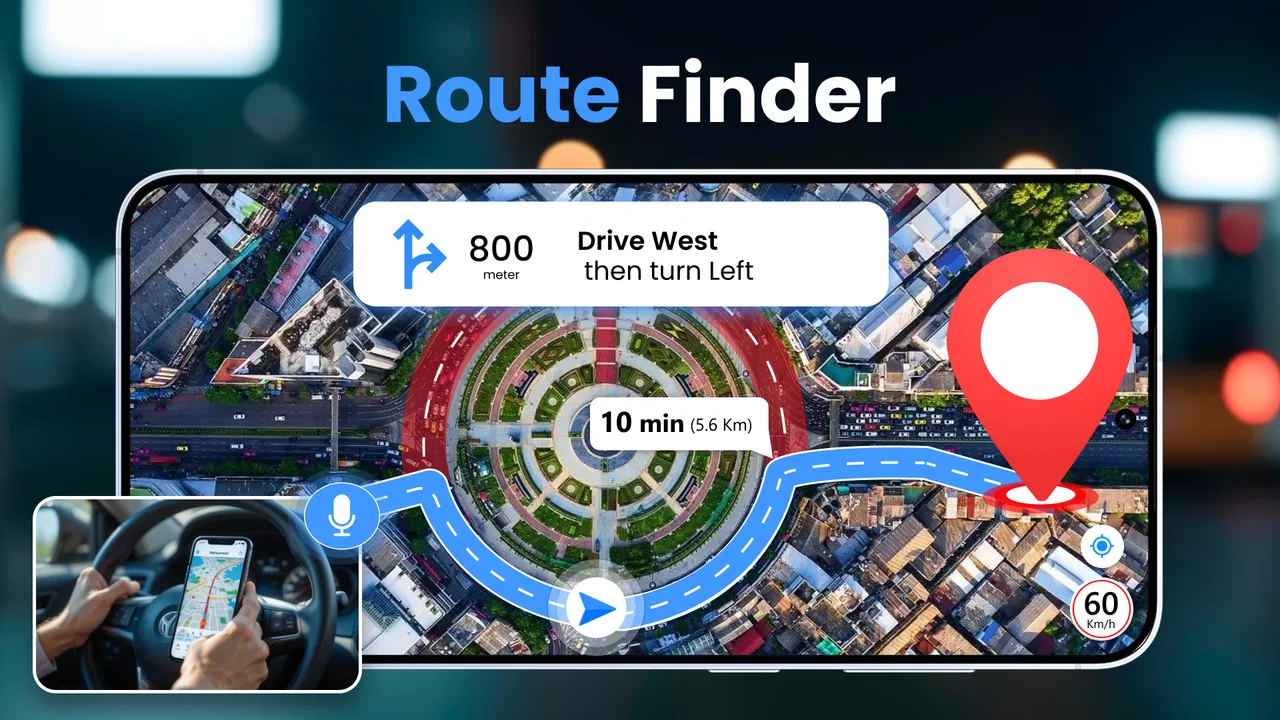
Voice GPS Navigation Direction is a navigation app designed to provide turn-by-turn driving guidance using spoken instructions. After entering a destination, the app calculates a route and uses your phone’s GPS location to guide you along the journey. Depending on the available features, it may also display maps, estimated travel time, distance, route alternatives, and location information while you drive.
02Does Voice GPS Navigation Direction require an internet connection?
An internet connection may be needed to search for destinations, load map data, calculate routes, receive traffic information, or update points of interest. GPS itself can determine your approximate location without mobile data, but that does not always mean the entire navigation experience works offline. Before traveling, check whether offline maps are supported and download the necessary areas if the app provides that option.
03Can I use the app for walking, cycling, or public transportation?
The app’s main purpose appears to be voice-assisted GPS navigation, but the available travel modes can vary depending on its version and map services. Some users may find options for driving, walking, cycling, or other transportation, while others may only have car navigation. Review the mode-selection screen before relying on it for a specific journey, especially when route restrictions or pedestrian paths are important.
04Is Voice GPS Navigation Direction accurate and reliable for everyday driving?
The app’s accuracy depends on your phone’s GPS sensor, signal quality, map data, and the reliability of the route service behind it. In open areas, location tracking and spoken directions can generally be useful, but buildings, tunnels, poor weather, or weak signals may cause delays or positioning errors. Always follow road signs and local traffic laws rather than depending exclusively on the application.
05What permissions and phone settings does the app need?
Voice GPS Navigation Direction normally requires location access so it can identify your position and provide live guidance. It may also request permission to use mobile data, notifications, Bluetooth, or audio output, particularly when directions are played through a car system. For the best experience, enable location services, allow voice playback, keep the device charged, and review the app’s privacy permissions before granting access.
Pros
- Clear turn-by-turn voice guidance helps you keep your eyes on the road.
- Multiple route options make it easier to compare travel times.
- Spoken street names reduce the need to check the screen frequently.
- Useful for unfamiliar areas
- especially when driving alone.
- Simple navigation controls are easy for most users to understand.
Cons
- Voice directions may become confusing at complex intersections.
- Accurate navigation depends on reliable GPS and location permissions.
- Some features may require an active internet connection.
- Background use can noticeably increase battery consumption.
- Traffic and map information may not always be completely up to date.

Voice GPS Navigation Direction
Gallery